Kubernetes Autoscaling Is Not a Strategy: HPA, KEDA, Cluster Autoscaler, and Karpenter Compared
Published June 3, 2026 · Opinion
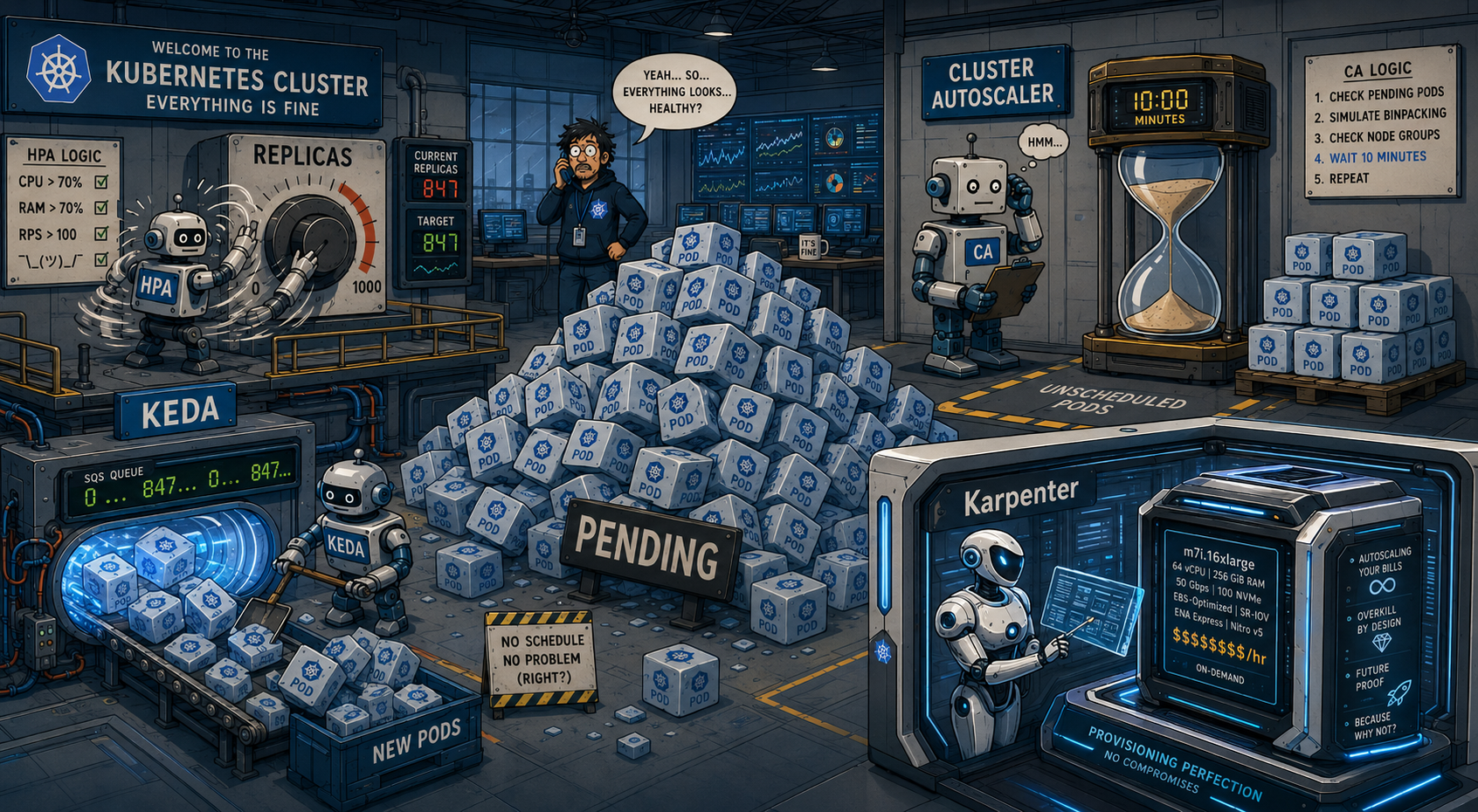
Most clusters do not have an autoscaling strategy. They have an autoscaling sediment layer. HPA went on the API deployments first. KEDA arrived later, when someone needed to scale workers off SQS queue depth and HPA could not see the queue.
Cluster Autoscaler has been provisioning nodes since the beginning of time, or maybe since 2019, which in Kubernetes years feels the same. Last quarter someone spun up a Karpenter prototype in a new cluster because the AWS bill finally got embarrassing enough that leadership noticed.
None of these systems know about each other. Your HPA scales pods up. Cluster Autoscaler eventually notices and provisions nodes, five minutes after the pods were already pending. KEDA scales a different workload to zero at night, but Cluster Autoscaler won't terminate the node because there's a system DaemonSet holding it hostage. Karpenter is in the other cluster doing its own thing, consolidating nodes while you're trying to debug why the first cluster can't scale down.
This is not a coherent autoscaling strategy. This is four independent control loops that happen to coexist in the same YAML namespace and occasionally fight over the same resources. The fact that all four are "working" does not mean they're working together.
The Landscape
HPA is the oldest and simplest piece of this puzzle. It runs a control loop every 15 seconds by default, checking metrics for your deployment, doing some math, and adjusting replica counts. The controller looks at current utilization, compares it to your target, and calculates desiredReplicas = ceil(currentReplicas × (currentMetric / targetMetric)). If your pods are at 80% CPU and your target is 50%, you get more pods. If you're at 20%, you get fewer, but only after a five-minute stabilization window by default because HPA is deeply conservative about scaling down.
The metric lag is real. HPA queries the metrics server, which scrapes kubelets, which aggregate cAdvisor data. You're looking at the past, usually 30-60 seconds old on a good day, longer if your metrics pipeline is having opinions. The cooldown windows exist because someone in 2016 learned the hard way what happens when you let a control loop thrash.
KEDA sits on top of HPA as a metrics adapter and scaler. It does not replace HPA. It creates HPA objects for you based on event sources. The pitch is that you can scale on things that aren't CPU or memory: SQS queue depth, Kafka consumer lag, Prometheus queries, the number of unread emails in your Gmail inbox if you're feeling creative. KEDA runs its own controller that watches ScaledObject resources, provisions HPA configurations, and feeds external metrics into the metrics server. When your queue is empty, KEDA scales to zero. When messages appear, it scales from zero to one, then HPA takes over for 1-to-N.
Cluster Autoscaler solves a different problem. Pods are pending because there's no node with enough capacity. Cluster Autoscaler notices this, looks at your node group configuration, does some bin-packing math to figure out which instance type would fit the pending pods, and asks the cloud provider for more nodes. Scale-up is relatively aggressive. Scale-down is paranoid. By design, Cluster Autoscaler will only terminate a node if every pod on it can be rescheduled elsewhere AND the node has been underutilized for 10 minutes AND none of the pods have local storage AND there are no PodDisruptionBudgets blocking eviction AND the moon is in the correct phase. The FAQ literally has a section called "I have a couple of nodes with low utilization, but they are not scaled down. Why?"
The answer is always one of twelve different safety checks that you didn't know existed.
Karpenter takes a different approach. Instead of managing groups of identical nodes, it provisions exactly what your pending pods need right now. It looks at pod requirements, bin-packs them into the most efficient instance type, and provisions directly without autoscaling groups as an intermediary. Consolidation runs continuously, not after a ten-minute timer. It can replace a node with a cheaper one if the workload allows. It handles spot instances as a first-class concern instead of an afterthought bolted onto node groups. The tradeoff is that you're giving Karpenter significantly more control over your infrastructure topology, and if you misconfigure NodePools you will absolutely provision an instance type that costs more per hour than your first apartment.
Where Teams Go Wrong
The most common mistake is treating autoscaling as a collection of independent features you enable rather than a system with feedback loops that interact. HPA scales your pods. Pods go pending. Cluster Autoscaler adds nodes. Nodes come online. Pods schedule. HPA sees lower per-pod utilization because load is distributed. HPA scales down. Nodes are underutilized. Cluster Autoscaler waits ten minutes, then starts the termination dance. This loop is working exactly as designed, but teams act surprised when it takes eight minutes to scale up and twelve to scale down.
The second mistake is running KEDA and HPA on the same deployment without understanding that KEDA creates an HPA under the hood. I have seen multiple clusters where someone manually created an HPA, then later added KEDA, and now there are two HPAs fighting over the replica count like divorced parents with different ideas about screen time. KEDA's ScaledObject will create an HPA for you. If you already have one, you get to experience the joy of dueling control loops.
The third mistake happens when KEDA is scaling on queue depth while HPA is scaling on CPU. Your queue fills up. KEDA scales to 10 replicas. The work is CPU-light. HPA sees 20% CPU utilization and helpfully scales back down to 3 replicas. Queue fills up more. KEDA scales up. HPA scales down. The metrics dashboards look like a seismograph during an earthquake and your workers are stuck in an endless scaling loop.
Cluster Autoscaler's bin-packing problem bites teams who run workloads with very different resource profiles in the same node group. You have pods that need 4GB RAM and 0.1 CPU next to pods that need 0.5GB RAM and 2 CPU. Cluster Autoscaler provisions nodes that fit some of your pending pods but not others. You end up with nodes at 60% memory and 30% CPU, which is not underutilized enough to terminate but also not efficiently packed. The cloud bill grows, utilization stays mediocre, and everyone argues about who specced the instance types.
Running Karpenter and Cluster Autoscaler in the same cluster is technically possible and spiritually cursed. They will both try to manage nodes. They will both see pending pods. Karpenter will provision a node. Cluster Autoscaler will provision a different node. One of them will eventually try to consolidate or terminate something the other one just created. The resulting behavior is like watching two Roombas programmed to clean the same floor but with no awareness of each other.
The final mistake is migrating to Karpenter because someone read a blog post about cost savings without understanding that Karpenter's value comes from workload diversity and spot tolerance. If you're running a homogeneous workload that needs on-demand instances with predictable capacity, Cluster Autoscaler's node groups are simpler and you will not see dramatic savings from Karpenter's bin-packing optimizations. Karpenter shines when you have spiky workloads, can tolerate spot interruptions, and need fast scale-up without pre-warming autoscaling groups.
When to Use What
Use HPA for workloads where CPU or memory utilization is a meaningful signal. API servers, web frontends, anything where requests-per-second correlates with resource usage. Set your target utilization based on actual load testing, not vibes. 50% sounds safe but is probably wasteful. 80% sounds dangerous but is often fine if your scale-up time is faster than your traffic spikes.
Use KEDA when you need to scale on something other than CPU or memory. Queue depth is the canonical use case. Consumer lag, cron schedules, external metrics from your observability system. KEDA works with HPA, not instead of it - it manages an HPA object on your behalf. The mistake from earlier (dueling control loops) happens when you also create a manual HPA on the same deployment. Let KEDA create the HPA. Do not create your own. You are not smarter than the control loop.
Use Cluster Autoscaler if you have predictable workloads, want to manage node capacity in groups, and don't need subsecond provisioning. The conservative scale-down behavior is a feature, not a bug. It prevents the cluster from thrashing. The ten-minute window exists because production stability is more important than your AWS bill, even if finance disagrees. If you need faster scale-down, adjust scale-down-delay-after-add and scale-down-unneeded-time, but understand you are trading stability for cost.
Use Karpenter if you have diverse workloads, can use spot instances, and need fast scale-up. The consolidation feature is legitimately excellent. The ability to provision exactly the right instance type for pending pods is significantly better than Cluster Autoscaler's node group constraints. Migration makes sense when your Cluster Autoscaler config has become a maze of node groups trying to handle every possible workload profile. Do not migrate just because Karpenter is newer. Migrate because your workload matches Karpenter's strengths.
Run HPA or KEDA for pods. Run Cluster Autoscaler or Karpenter for nodes. Not both node autoscalers. Pick one. The decision tree is shorter than you think. If you're on EKS and have spiky workloads with spot tolerance, Karpenter is probably the right choice. If you're on GKE or AKS, use Cluster Autoscaler because Karpenter's cloud provider support outside AWS is still maturing. If you're running boring, predictable infrastructure, Cluster Autoscaler is fine and you should spend your migration energy on something that matters.
Autoscaling is not a strategy. It's a set of control loops that need to work together. Configure them with that in mind, or prepare to spend a lot of time explaining to leadership why the cluster scaled to 47 nodes at 2 AM and never scaled back down.
Source Links
Related Pages
- Parent index: Blog
- Related: Multi-Cloud Kubernetes: The Honest Take
- Related: Those Kubernetes CVEs You Thought Were Fixed? About That...
- Evergreen reference: Kubernetes overview